/ Pankaj Vaghela
Design System Workflow: reusable components, with review built in
An open-source collection of seven AI agent skills for planning design systems, building reusable components, and assembling screens with explicit review stages.
While designing an app with an AI agent, I spent more time fixing components than I expected.
We had duplicate sources, variants that changed unrelated content, and screens that needed rebuilding after the components were finally organized. Each correction looked small in isolation. Together, they exposed a problem with the order of the work.
We were assembling screens before we had agreed on the reusable pieces underneath them.
That experience became Design System Workflow: an open-source collection of seven AI agent skills for taking a design from its current state to reusable components and linked screens, with explicit review between stages.
Seven stages of Design System Workflow, each followed by review: brief and current state, palette and theming, layout exploration, component contracts, components and variants, linked screen assembly, and verification and handoff.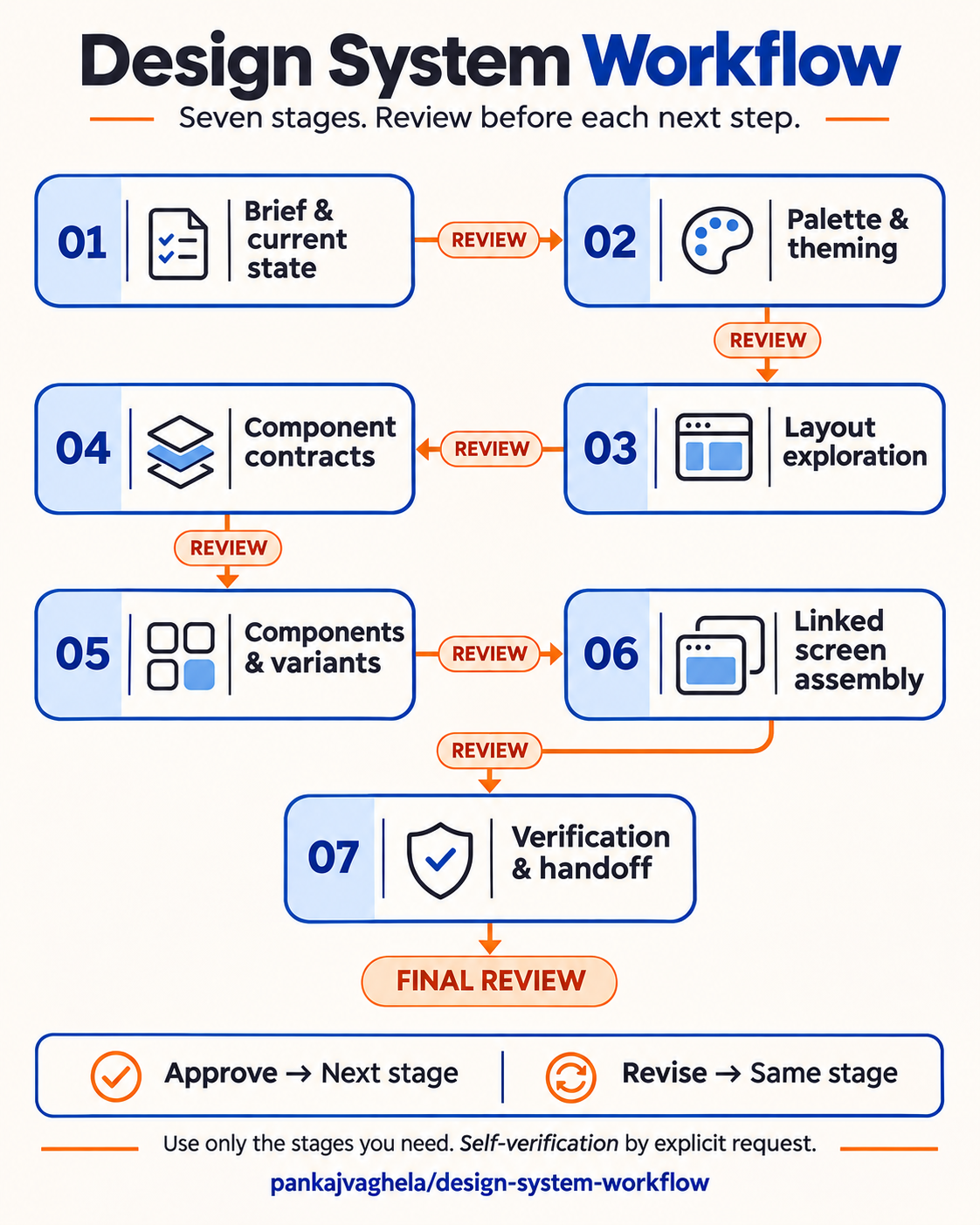
The order of work matters
A screen can look right while its underlying structure is difficult to maintain.
Two matching cards might be unrelated copies. A bookmarked variant might accidentally contain a different event. A section might look reusable while actually being a group of detached elements. Fixing the source later does not necessarily fix the screens built from those copies.
The workflow starts by inspecting what exists. It reuses approved decisions and establishes component responsibilities before final assembly. Early exploration can still use temporary parts; the selected design is then built from real reusable sources.
A workflow with review built in
The full route has seven stages. The agent chooses the smallest relevant route rather than treating every task as a complete design-system project.
| Stage | What happens | What gets reviewed |
|---|---|---|
| Brief and current state | Inspect the design, requirements, existing library and constraints. | Scope, assumptions and intended outcome. |
| Palette and theming | Reuse approved foundations or define the semantic colors and themes the product needs. | Representative previews and contrast evidence. |
| Layout exploration | Explore hierarchy, navigation, density and screen structure. | Alternatives and the direction to pursue. |
| Component contracts | Define names, states, content slots and layout responsibilities. | The component plan and reuse decisions. |
| Components and variants | Build canonical controls, domain components and composed sections. | Linked examples with the required states. |
| Linked screen assembly | Assemble screens from approved instances. | Complete layouts, content, spacing and source relationships. |
| Verification and handoff | Check the visible result and underlying structure; document implementation needs when requested. | Evidence, limitations and the finished result. |
Palette and theming can precede visual exploration, as shown here. Structural layout exploration can come first when it does not depend on color decisions. Existing approved foundations do not need to be redesigned. A small correction can be a single edit, verification and review stage.
At every applicable stage, the agent produces something concrete and stops for review.
“Continue” should have a clear meaning
I wanted to keep control of the design without having to supervise every individual edit.
The default is to finish a stage, show the result and wait. Feedback revises the current stage. “Continue” authorizes the next stage, not the whole remaining project.
There is also an explicit faster route:
Continue till the end with self-verification.
That lets the agent proceed through the agreed remaining stages while checking its work. It still needs to stop for a missing material decision or a change in scope. Saying “pause” or “review first” restores the review gates.
Silence does not count as approval.
Seven skills, with one entry point
The design-workflow skill coordinates the work. Six focused specialists handle foundations, components, assembly, consolidation, handoff and verification.
The distinction between stages and skills matters. One skill can help with several stages, and some jobs need only a small part of the pack. A component audit should not automatically become a redesign.
A few principles run through all seven skills:
- Reuse a valid canonical source before creating another.
- Keep content separate from state: bookmarking an item should not change its title or image.
- Check real component links alongside screenshots.
- Preserve agreed spacing and content during migration.
- State when the editor does not support a required operation.
- Distinguish a successful save from a verified reopen.
App-independent, with honest limits
The workflow grew from practical work in OpenPencil, but its core instructions are independent of a particular editor. The repository keeps OpenPencil observations in a separate reference so they do not become assumptions about every design tool.
The pack supplies instructions. It does not provide an editor connector. An agent needs suitable access to inspect and edit live designs. Without that access, it can still work from supplied material on planning and review, while making the limitation clear.
Installation has been checked for Codex and Claude Code, including all seven skills and their supporting references. That is not a claim that every workflow has been validated in every editor.
Try it
From your project directory, install all seven skills for Codex:
npx [email protected] add pankajvaghela/design-system-workflow --skill '*' --agent codex
For Claude Code, replace codex with claude-code. Use --agent codex claude-code to install for both. Install the whole pack so the skills' references to one another remain available. The README lists prerequisites and installation details.
Then ask your agent:
Use design-workflow to improve this screen. Inspect the current design and existing components first. Reuse approved palette and themes, and wait for my review between stages.
The project is available under the MIT license:
Explore Design System Workflow on GitHub
If you are using AI agents for UI design, I would love to hear where your workflow starts to break down—and what you have found useful for keeping components and screens consistent.